
Cameras that record are normal.
Cameras that tell you are not.
Our AI watches your footage: it recognises people and vehicles, logs what happened into a searchable timeline, and emails you with the camera frame the moment someone is on site after hours. We install the cameras too, so the whole system works as one.
Person detected at Front. Email with the camera frame sent to 3 recipients. Repeat alerts paused for 30 minutes.
This is what the AI is doing, all night
A person walks into frame at 11:42pm. The AI picks out the person, the vehicle and the open door, and an alert goes out with the frame attached. No one had to be watching.
Everything the AI saw, in one screen
Live views with detection boxes, a timeline of what actually happened, the alerts that went out, and counts you can act on. This is the dashboard we run on our own site.
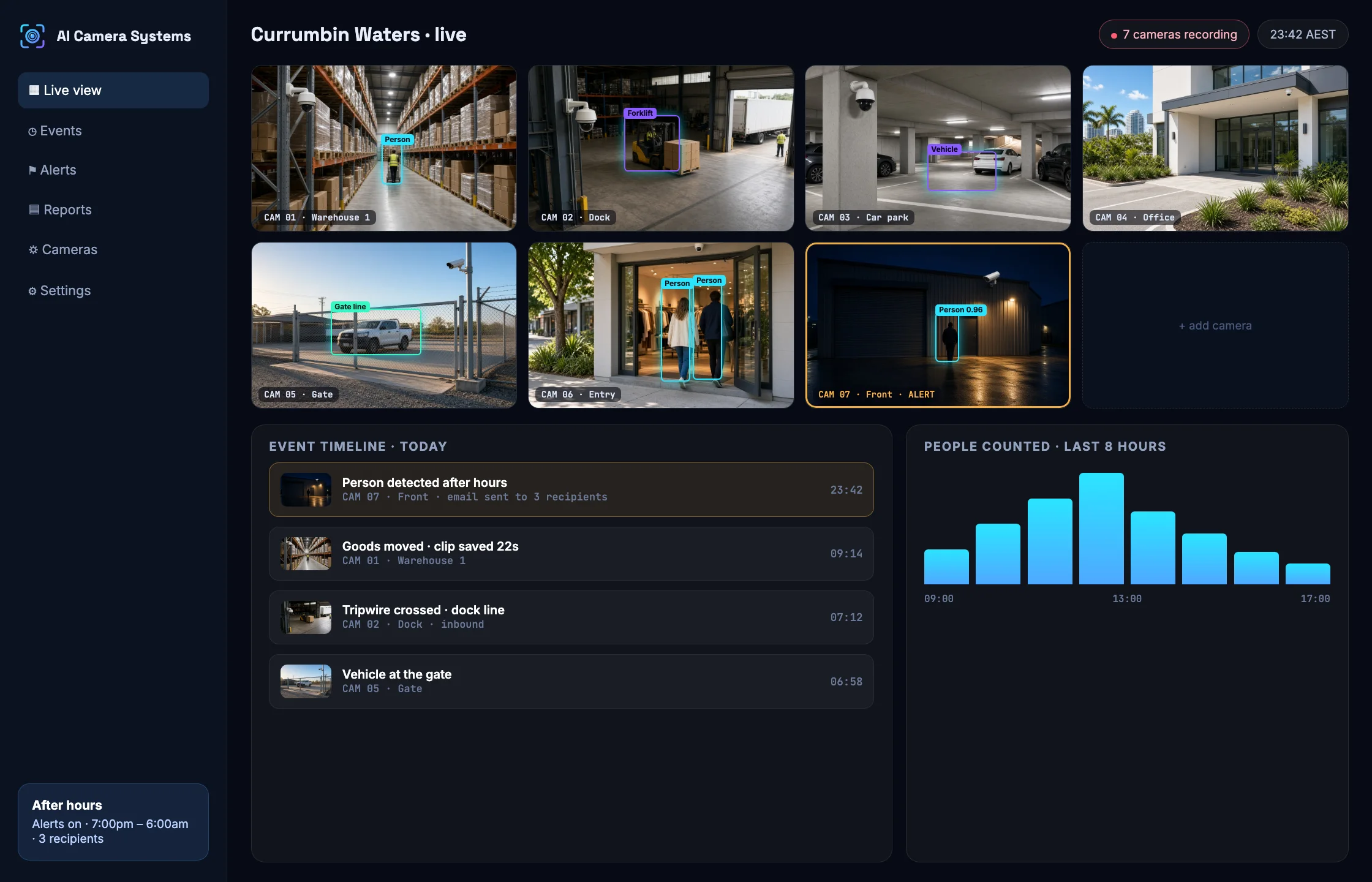
Live detection
Boxes drawn on the cameras you are watching, reading the same local stream so your recorder is not hit twice.
Searchable events
Every detection becomes a timeline entry with a short clip, so finding a moment takes seconds instead of an afternoon.
Counts and reports
People and vehicles per camera over time: when deliveries really arrive, when the counter gets busy.
It wakes you only when it should
Motion alerts fire on rain, insects and headlights until everyone turns them off. The AI checks what it is actually looking at, so an alert means a person or a vehicle was really there, outside the hours you set.
- Your hours, your rules. Opening times, closed days and weekends all count as after hours if you want them to.
- The frame comes with it. You see what triggered the alert in the email, before deciding whether to drive in.
- Cooldowns stop the flood. One visitor cannot send forty emails, which is why these alerts stay switched on.
- Everyone who needs it gets the alert: you, the manager, the security contact.
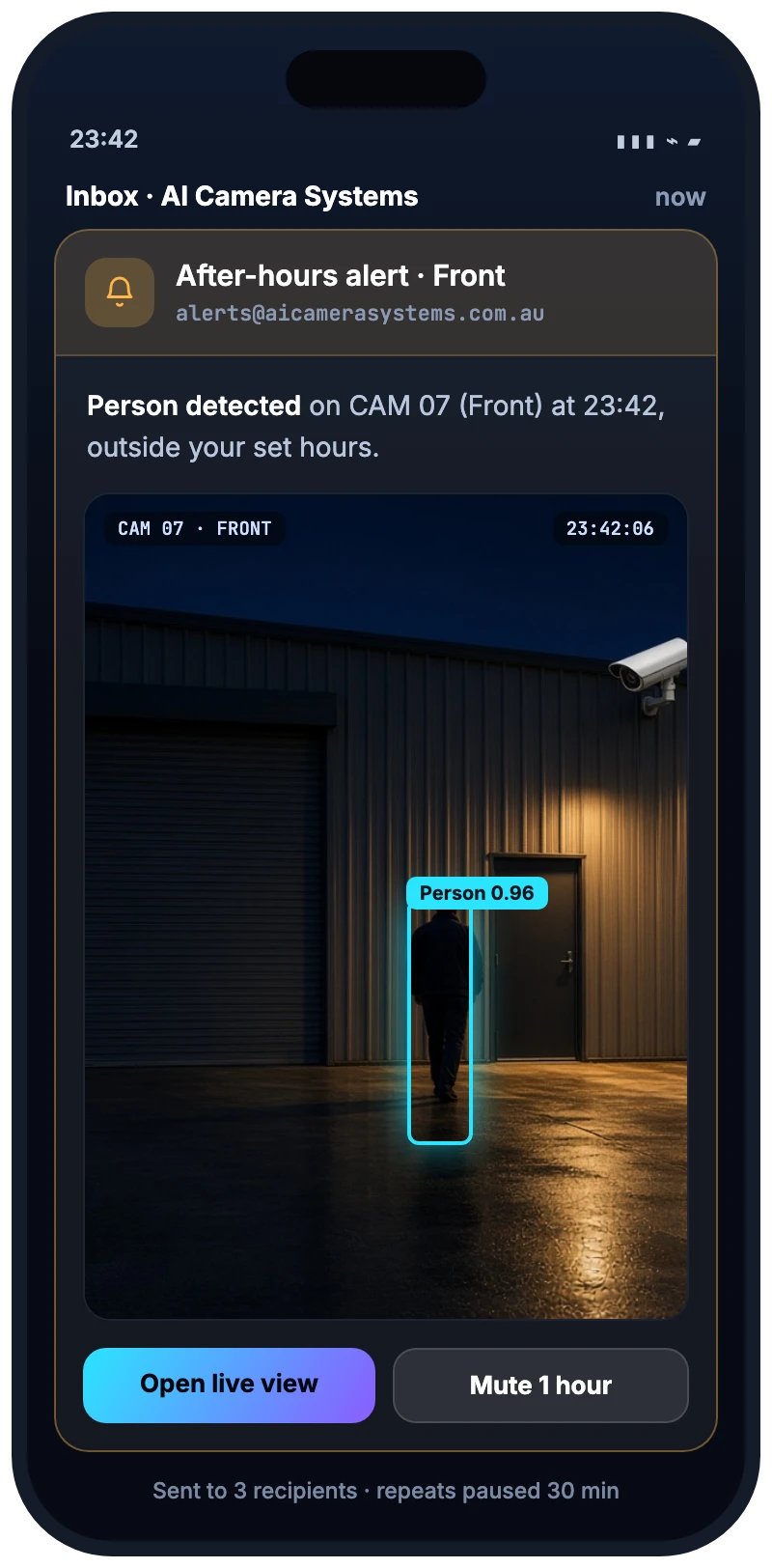
The alert as it arrives, 11:42pm
Six things the AI does with your footage
Turn on what suits your site. Each one is tuned per camera, per zone and per hour.
After-hours monitoring
Your cameras keep recording after everyone goes home, but nobody is watching them. This sweep checks the cameras on…
Read moreLive view
Nobody can watch sixteen tiles at once. With the live view open, the system marks what it sees on…
Read moreSearch and review
Finding one moment in a day of footage is the worst job in the building. The timeline turns analysed…
Read moreZones and lines
Motion in a frame tells you almost nothing when the frame includes a public footpath. A line across the…
Read moreCounting and reports
Most businesses run on a feeling about how busy they are. Counting turns the cameras you already have into…
Read moreStock and shrinkage
Stock going missing is usually discovered weeks later, in a count. This compares movement events on your cameras with…
Read moreSee what the AI sees
Pick a scenario. This is a simulation of the view and event feed our dashboard produces, not customer footage.
Person detected at Front. Email with the camera frame sent to 3 recipients. Repeat alerts paused for 30 minutes.
Someone is on site at 11:42pm
Outside the hours you set, the AI sweeps the cameras. When it sees a person it emails the people you nominate with the frame attached, then holds off on repeats so one visitor doesn't send forty emails.
How many people, and when
Counts of people and vehicles per camera build a picture of your day: when deliveries actually arrive, how busy the front counter gets, which hours need another pair of hands.
A line across the dock
Draw a line across a gate, roller door or aisle and crossings become events. Zones cover restricted areas, and door activity is logged the same way, ready to trigger an alert.
Goods moved, paperwork checked
When the AI sees goods being moved it records the event with a clip, and those movements can be cross-checked against your records to flag what doesn't match. It raises the question; your team answers it.
From camera to your inbox
Your recorder keeps doing its job. We add the layer on top that reads the frames and turns them into events you can search and alerts you actually want.
Cameras & recorder
IP cameras we install, or the ones you already have, recording to an NVR on your network.
AI analysis
Frames go to the detection models, with budgets per camera so processing costs stay flat.
Events & clips
What happened becomes a searchable timeline, with a short clip captured around each event.
Alerts to people
Outside your hours, matching events email the people you choose, frame attached.
We run this AI on our own building
The platform wasn't bought in and rebadged. We wrote it for our own warehouse, where seven cameras feed it every day, and we only sell what we rely on ourselves.
- Seven cameras, one recorder. Warehouse floors, the front, the side, the office and the driveway.
- Alerts that are actually on. After-hours sweeps email us with the frame; cooldowns stop the spam that makes people switch alerts off.
- Events we can search. Goods movements, door activity and tripwire crossings, each with a clip.
What the AI watches for on your kind of site
Every site has different risks and blind spots. These are the ones we tune for most.
Warehouses and logistics
We run this system in our own warehouse every day — seven cameras on a Dahua…
Retail and shopfronts
Shops lose stock at the counter, in the stockroom and overnight, and the vision is always…
Construction and civil
A site is empty for most of the hours it is at risk. We install cameras…
Workshops and automotive
A workshop holds other people's vehicles, a board full of keys and a parts store worth…
Offices and strata
Offices and strata buildings have the same handful of problem spots: the entry, the car park,…
Farms and rural
Farms get the hardest version of this problem: long distances, thin connectivity, nobody home. We cover…
And yes, we install the cameras too
AI is only as good as what the cameras give it. We design the system around what you need to see, install it properly, then connect it to the AI layer so the whole thing works as one.
- Site walk-through and camera plan built around the job each camera has to do.
- Cabling, mounting, recorder, network and secure remote access, tidy and documented.
- Already have cameras? We will tell you honestly which are worth keeping and add the AI to those.
- You own it all, including the admin passwords.
What businesses ask us first
Do I need new cameras, or can you use the ones I already have?
In many cases we can work with existing IP cameras and recorders, which is the cheapest way to start. We check the resolution, placement and network first, because a camera pointed at the wrong spot stays useless no matter how good the software is. If a camera is too low-resolution or badly placed for what you want to detect, we will tell you rather than sell you analytics that cannot work.
Where is the footage stored? Does it go to a cloud service?
Your footage stays on your own recorder on site. The AI layer looks at frames and keeps the events, short clips and alerts it produces on our Australian server, so you are not paying for a cloud subscription that holds your entire camera history.
How is this different from the motion alerts my NVR already has?
Motion detection measures changing pixels, so rain, insects, headlights and moving branches all set it off, and people switch the alerts off within a week. The AI layer identifies what it is looking at, so an alert means a person or a vehicle was actually there.
What exactly happens when someone is on site after hours?
Within the hours you set, including closed days and weekends if you want, the system sweeps your cameras. When it detects a person, it emails everyone on your alert list with the camera frame attached, then holds off on repeats for a cooldown period so a single visit does not flood your inbox.
Will it tell me who someone is, or read faces?
No. The system detects objects such as people and vehicles and records what happened and when. It does not identify individuals, and we would not recommend face recognition to a business without serious legal advice first.
Do you install outside the Gold Coast and Brisbane?
We install directly across the Gold Coast, Brisbane and South East Queensland. Elsewhere in Australia we work with local installers for the physical work and set up, connect and support the AI layer remotely. Call us and we will be straight with you about what we can cover.